


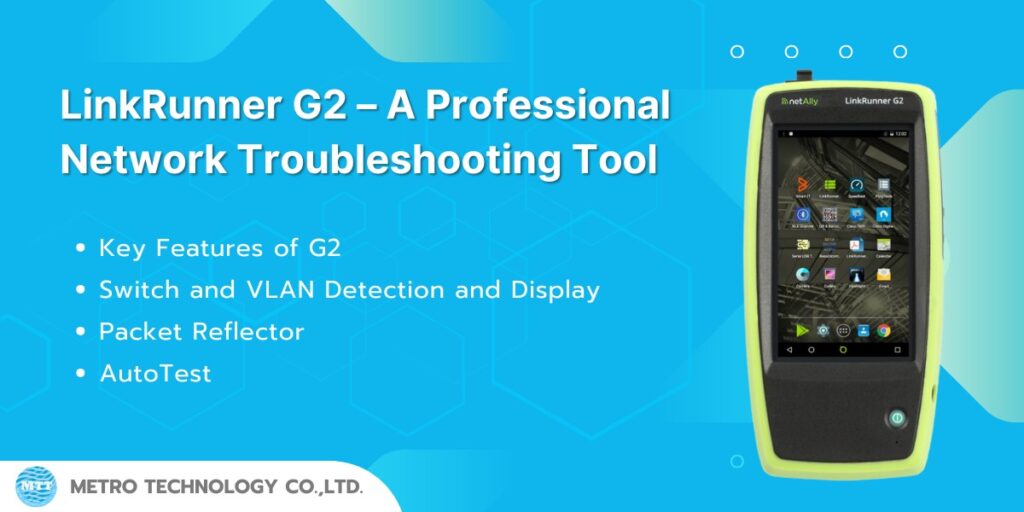
The intelligent network testing device LinkRunner® G2 has been discontinued as of December 31, 2026. It will continue to receive support through the AllyCare service only. But let’s take a look at how the LinkRunner® G2 actually works.
The LinkRunner® G2 simplifies the verification and configuration of both copper and fiber Ethernet networks.
It integrates essential functions for installation and basic troubleshooting into a single, rugged device designed for field use. This smart tool accelerates deployment, quickly identifies issues, and enhances network management efficiency — all powered by a next-generation testing platform running on the Android operating system.
The LinkRunner G2 includes all the testing features of the LinkRunner AT, but stands out with a more user-friendly design and support for Android apps—just like a smartphone.
Key Features
- Switch Identification & Network AutoTest
Quickly locate the nearest switch name and port using CDP/LLDP/EDP protocols, while verifying link speed, duplex mode, and TCP/IP network connectivity with the AutoTest feature. - Advanced PoE and VLAN Testing
Test Power over Ethernet (PoE) up to 90 watts and handle complex VLAN and DHCP configurations in a single test—ideal for deploying IoT devices, VoIP phones, and Wi-Fi access points. - Android App Support
Install and run Android applications as needed—such as speed testing, device configuration, or workflow management—through an intuitive, smartphone-like interface. - Seamless Cloud Integration
Automatically upload and manage test results with full support for collaboration via Link-Live Cloud Services.
LinkRunner G2 Smart Capabilities
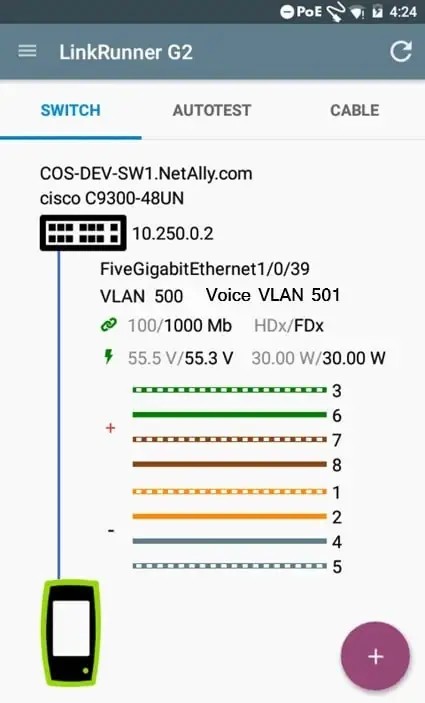
Detect and Display Information from the Nearest Connected Switch and VLAN
The LinkRunner G2 utilizes the IEEE Link Layer Discovery Protocol (LLDP) along with Cisco Discovery Protocol (CDP) and Extreme Discovery Protocol (EDP) to display key details such as the model of the nearest switch, slot location, port number, and the assigned VLAN.
The LinkRunner G2 can display key information about the nearest switch, including:
- Switch name and model
- Chassis name, slot number, and port
- IP address of the switch
- Supported VLANs
- Duplex mode and link speed (both actual and advertised values)
- Signal strength
- Connection type (MDI or MDI/X)
- PoE voltage and power levels (both actual and test values)
- Graphical representation of PoE power delivery across wire pairs
TruePower™ PoE Testing Up to 90 Watts of Load
The LinkRunner G2 is the first field tester capable of verifying PoE performance under actual load conditions, drawing up to 90 watts in accordance with the IEEE 802.3bt standard across all four wire pairs.
The tool applies load to the circuit to test the capability of the switch, cabling, and patch panels—while simultaneously measuring voltage and identifying which pairs are delivering power.
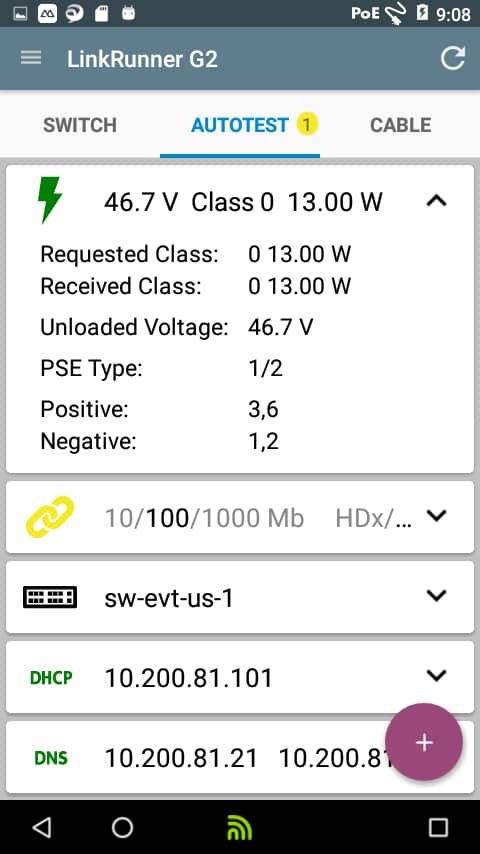
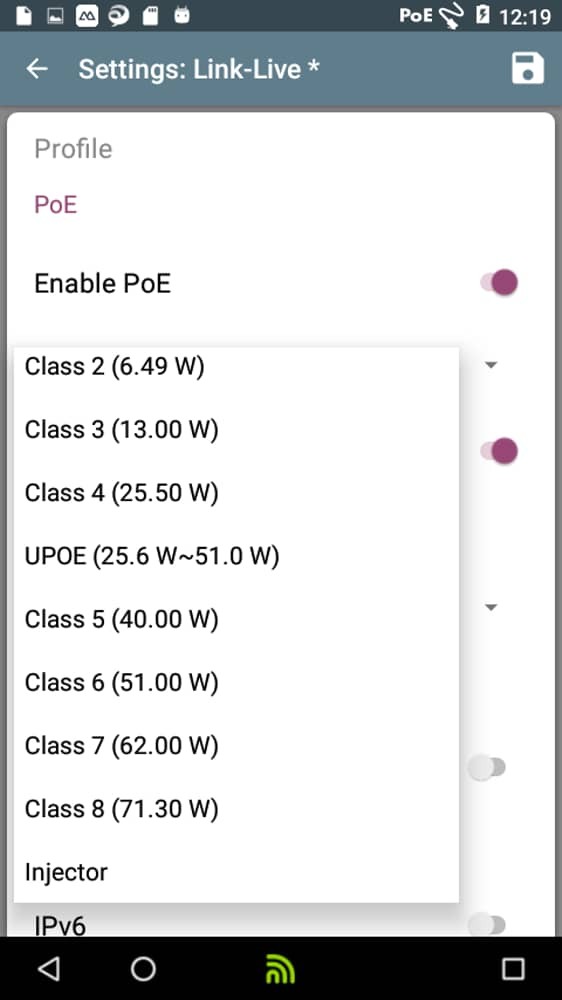
Using TruePower™ testing, the LinkRunner G2 ensures reliable power delivery before installing IoT devices on the network, helping to guarantee smooth deployments and avoid post-installation issues.
Packet Reflector
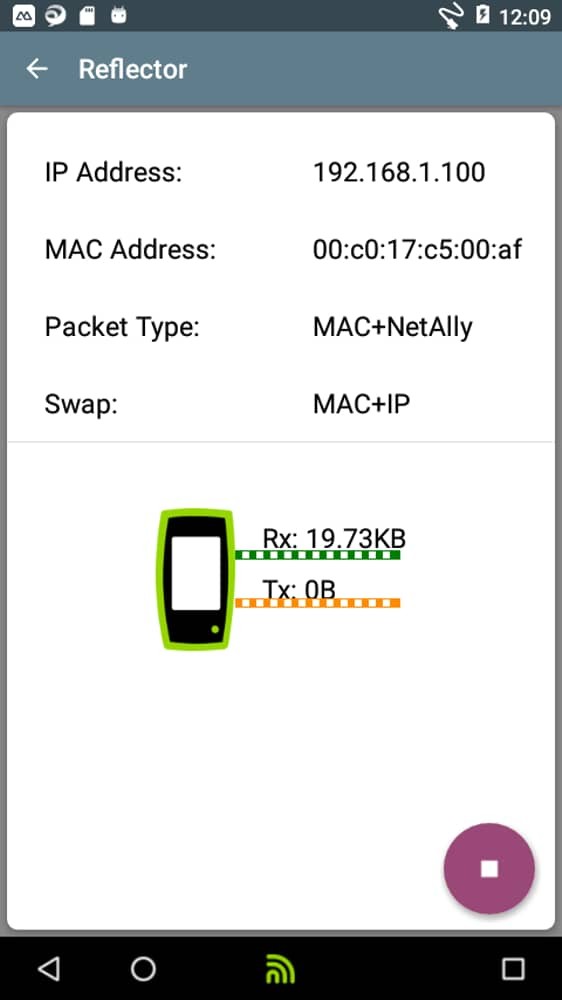
The LinkRunner G2 packet reflector mode can be used as a remote device during end-to-end network path performance tests to validate LAN and WAN throughput capabilities up to 1Gbps.
LinkRunner G2 supports packet reflection for:
- EtherScope® nXG Portable Network Expert
- LinkRunner® 10G Advanced Ethernet Tester
- OptiView® XG Network Analysis Tablet
- OneTouch™ AT Network Assistant
VLAN Monitor & Packet Capture
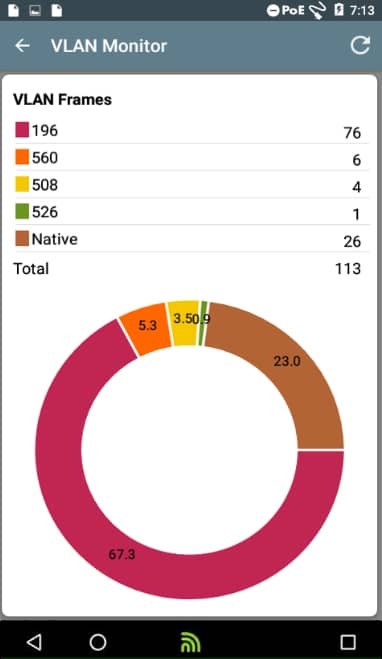
The LinkRunner G2 can monitor and show traffic distribution of the top 9 VLANs and capture 2GB of packets at line-rate.
Automated Test Results Management
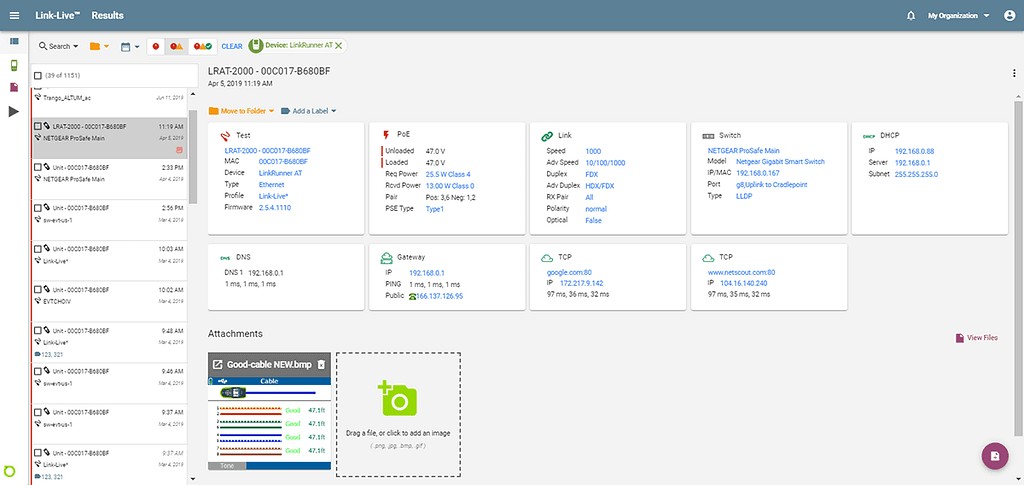
- Complimentary Link-Live Cloud Service stores test results and site data upload for automated reporting and documentation.
- Simplifies report generation across media types for network deployment documentation.
- Reduces results management overhead for multiple testers and users.
- Enables seamless collaboration between site personnel and remote experts.
- Attach photos, user comments to each result, adding context for future changes and troubleshooting.
- For asset management, ability to associate serial numbers of installed devices, and/or cable/wall jack label to specific test results.
LinkRunner G2 vs. LinkRunner AT 4000
While the LinkRunner G2 and LinkRunner AT 4000 are both network testers that help IT and System Integrators verify and troubleshoot Ethernet access networks, the LinkRunner AT 4000 is a cutting-edge network cable tester for modern networking tasks and infrastructural diagnostics. Designed for network engineers requiring a robust toolset for both fiber and Multigigabit Ethernet environments, it offers:
- Advanced network discovery and topology mapping.
- Comprehensive diagnostics and troubleshooting features, enhancing network visibility and operational efficiency.
- A robust set of automated tests for precise network validation and troubleshooting, ensuring seamless moves, adds, and changes.
A Smart Tester with Android App Support
The LinkRunner G2 is the first network tester that offers smartphone-like features, including a 5-inch touchscreen, built-in camera, flashlight, and Android operating system. Multiple work-related apps can be installed directly onto the device—eliminating the need for a separate tablet or smartphone.
With optional Wi-Fi and Bluetooth, as well as dedicated copper and fiber Ethernet interfaces, the LinkRunner G2 can communicate directly with a variety of endpoint devices for configuration.
Because app installations can be controlled, it poses less of a security risk than using personal smartphones.
Typical Workflows with LinkRunner G2
- Receive trouble tickets
- View PDFs or other work-related documents
- Verify PoE and network connectivity using AutoTest
- Automatically save test results locally or upload to Link-Live Cloud Services
- Use the built-in camera to document installed devices, scan QR/barcodes, etc.
- Configure any device that supports Android apps or Chrome browser access:
a. Configure IoT devices (e.g., security cameras, access points, digital lighting controllers, HVAC systems)
b. Use Telnet to connect to switches
c. Run internet speed tests
Real-World PoE Power Testing
The LinkRunner G2 is the first field tester capable of verifying PoE power delivery performance under real load conditions. It can draw up to 90 watts of power in accordance with the IEEE 802.3bt standard over all four wire pairs. The device applies load to the circuit to test the capability of the switch, cabling, and patch panel, while also measuring voltage and identifying which wire pairs are active.
Using TruePower™ testing to verify power delivery before installing IoT devices ensures smooth deployment and helps eliminate the “finger-pointing” often associated with failed installations.

Programmable AutoTest Profiles for IoT Projects
For certain IoT system installations, network services must be tested at various stages of deployment. The necessary AutoTest profiles can be created to ensure the LinkRunner G2 tests specific configurations at each step of the installation process, providing clear documentation of whether the installation has passed or failed.
Additional information can be added to the test results, such as images of the installation site (using the built-in camera of the LinkRunner G2), serial numbers of the IoT devices scanned via the barcode scanning app, and comments from the technician.

Device and Core Service Connectivity
The LinkRunner G2 can test connectivity using Ping, TCP port open, or HTTP connection tests. The tests provide information about the connectivity and response times to the designated default gateway, required DNS server, and backup DNS server.
LinkRunner G2 supports unlimited connectivity tests to any user-defined devices, servers, or services, based on IP address or URL. It can continuously test specific targets to verify irregular behavior, based on response times.

Cable Length, Wiring Verification, and Cable Location
Easily locate cable cuts, shorts, miswiring, and pair separation in 3 ways
- On disconnected cables
- Using the WireView Cable Identifier
- Through the wiremap port installed on the LinkRunner AT
The LinkRunner G2 has the unique capability of detecting and testing the distance to an open cable location, even when connected to a switch.

Cable Location
Locate cables using toning, switch port advertisement, switch port blinking lights, and the remote cable identifier. Toning supports both Analog and Digital IntelliTone modes.
802.1x Authentication
Verify access to secure networks using 802.1x and MAC Access Control Lists (ACL). Users can also configure the EAP type for 802.1x and enter passwords as needed.

Automated Test Result Management
The free Link-Live Cloud service acts as a centralized test result and device management system. It transforms the workflow of teams by enabling quick and easy recording, documenting, and reporting of test activities from LinkSprinter®, LinkRunner AT, LinkRunner G2, LinkRunner 10G, AirCheck™ G3, and EtherScope nXG portable network testers.
When devices are connected to the Link-Live Cloud service, your test results are automatically uploaded to the dashboard for project management and reporting. You can upload additional files, screenshots, images, profiles, packet captures, location data, and comments at any time. Additionally, some NetAlly devices with AllyCare support can receive “over-the-network” firmware updates from Link-Live when new updates are available.
An API is available to pull and integrate data from Link-Live into other management platforms, such as issue ticketing or network management systems, helping you better manage team operations and performance while providing easy proof of work.
This consolidated dashboard for both Wired and Wi-Fi network connectivity results allows you to:
For asset management, link the serial number of installed devices and/or cable/wall jack labels with specific test results.
Reduce the burden of test result management for multiple testers and users.
Enable seamless collaboration between on-site staff and remote experts.
Attach images and user comments to each test result to add context for future changes and troubleshooting.
LinkRunner G2 vs. LinkRunner AT Comparison
The LinkRunner G2 offers six key advantages compared to the LinkRunner AT

Comprehensive PoE Validation: Test voltage, measure power, support up to 90W from PSE, and measure voltage from PoE Injectors.
Network Readiness Verification for Complex Installations: Automatically detect VLAN in AutoTest and support DHCP Options 43, 60, and 150 for Wi-Fi access points and VoIP phones.
AutoTest for Network Testing at Various Installation Phases or Sizes: Set a variety of “Stop After” options, unlimited IP Targets for connection testing, “Continuous” testing function to check connection consistency with IP Targets, and large internal and external storage for test results and site data.
Work More Efficiently While Connected to a Switch to Reduce Trips Back to MDF/IDF: Detect link speed issues caused by cable faults, use 90W PoE power, and add images or comments to test results directly from the LinkRunner G2.
Use Android Apps to Streamline Workflow: Configure devices, connect to corporate systems or the internet via a web browser, and test functionality.
Effective Troubleshooting Functions: Protocol capture and VLAN verification.
.
If you’re interested in LAN cablesCat5e, Cat6, Cat6A, or Cat8, or if you need to rent network testing equipment or require installation services, feel free to inquire for more information at Metro Technology Co., Ltd. or click here to contact us.