


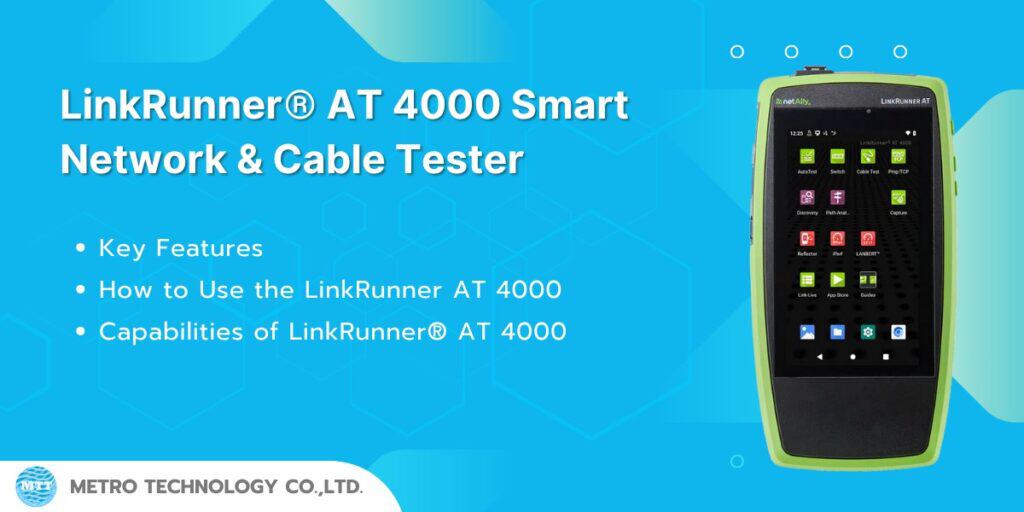
LinkRunner AT 4000 is a modern network cable testing tool designed for advanced network and infrastructure diagnostics. It is built for network engineers who need a robust tool for both fiber and Multigigabit Ethernet environments. Key features include:
- Advanced Network Discovery and Network Mapping: Provides detailed insights into network structure.
- Comprehensive Diagnostics and Troubleshooting: Enhances network visibility and operational efficiency.
- Robust AutoTest Suite: Allows for precise network testing and troubleshooting, ensuring smooth moves, adds, and changes.
Key Features
- Network Discovery and Mapping
Quickly discover your entire network and create a network topology map using the Link-Live reporting and analytics platform for instant visibility of data. - Comprehensive AutoTest
An 8-step AutoTest quickly checks and troubleshoots every aspect of network connectivity, including DHCP, DNS, gateway access, link speed, and service response times. - Link Speed and Duplex Verification
Instantly check link speed and duplex for 10/100 Mbps and 1 Gbps, with detection for Multigigabit links (NBASE-T 2.5G, 5G, 10 Gbps). - Advanced PoE Testing
Test Power over Ethernet (PoE) delivery up to 90W according to the 802.3bt standard under real-world conditions, ensuring reliable PoE device installation. - Advanced Network Cable Testing
The network cable tester performs detailed tests for cable length, wiring errors, and signal integrity, which are essential for maintaining a strong physical network infrastructure. - Path Analysis and Packet Capture
Provides detailed path analysis from the tester to a destination URL or IP, with packet capture features for in-depth network traffic analysis.
How to Use the LinkRunner AT 4000
Test it yourself and see how easy it is to use with the LinkRunner AT 4000 network cable tester. Click the orange dot to explore further.

Main Screen
Without proper visibility, troubleshooting issues affecting devices and various parts of the network can be challenging. The LinkRunner AT 4000 from NetAlly is an advanced cable and network tester for Multigigabit NBASE-T and fiber Ethernet networks. It comes equipped with comprehensive network discovery and topology mapping features, along with complex diagnostics and problem detection for in-depth troubleshooting.
Benefits
Using network discovery with Layer 2 and 3 path analysis provides full visibility to help resolve complex issues. At the same time, it offers AutoTest for moves, adds, and changes, allowing for quick testing and troubleshooting, which is what the LinkRunner AT family of testers is known for.

AutoTest
AutoTest is the most comprehensive testing application in the LinkRunner AT 4000. This app is fully customizable, with test profiles that can be saved and reusable test targets. Multiple profiles can be grouped together to allow one-button verification of connections across all VLANs. The results of AutoTest are automatically uploaded to the Link-Live platform after you register your LinkRunner AT 4000.
Benefits
AutoTest enables engineers to transfer network configuration knowledge to the tool, allowing field technicians to test different VLANs without extensive training. The result is repeatable testing with documentation and shorter overall test times, something that cannot be achieved with other testing methods.

Multi-Gig Link Verification
Wired link testing checks link speed/duplex for 10/100 Mbps and 1 Gbps, with detection for NBASE-T and Multigigabit links (2.5G, 5G, and 10 Gbps).
Benefits
Investment in Multi-Gig infrastructure is wasted if the cabling system cannot support the required speeds. However, diagnosing link speed degradation can be difficult, often leading to finger-pointing between cable contractors and equipment vendors. The LinkRunner AT 4000 provides clear evidence of the root cause of link speed issues by measuring the active link.

VLAN Identification and Analysis
The LinkRunner AT 4000 AutoTest will identify and list the VLANs supported by the connected switch port by analyzing the VLAN IDs of the received data. The LinkRunner AT 4000 will continue to display traffic distribution by VLAN until the next wired AutoTest is performed or the connection to the switch port is lost.
Benefits
Correct VLAN configuration of switch ports is crucial for the operation and security of modern networks to properly segregate different types of traffic. The LinkRunner AT 4000 AutoTest provides visibility and documentation of the switch port VLAN configuration automatically, making what used to be a complex verification task much easier.

Switch Visibility
The LinkRunner AT 4000 AutoTest will automatically detect the nearest connected switch port by analyzing the received xDP protocols (CDP, LLDP, and EDP). The LinkRunner AT 4000 will report the content of the first received xDP packet as the nearest switch in the AutoTest results and will continue monitoring received xDP traffic, listing the source devices and the content of the xDP traffic in the switch test details.
Benefits
The LinkRunner AT 4000 wired AutoTest provides a quick view of the configuration of the nearest connected switch port in most cases. Even when connected to switches with xDP traffic disabled or configured to send data only for a very short time, the LinkRunner AT 4000 can still provide visibility into the nearest xDP-capable device, eliminating the need for a protocol analyzer. This simplifies xDP configuration verification for network technicians.

Switch Testing
The switch test provides a graphical view of the nearest connection. The LinkRunner AT 4000 uses IEEE Link Layer Discovery Protocol (LLDP), along with Cisco and Extreme discovery protocols (CDP and EDP), to display the nearest switch’s name, chassis, model, slot, and port. It also shows other important information such as the switch’s MAC/IP address, connected and supported VLANs, link speed and duplex (link speeds up to 10G can be identified), connection type (MDI or MDI/X), and PoE voltage/power (both real and under test using TruePower™).
Benefits
You can quickly view switch information such as name/port, detected link speed/duplex, and VLAN configuration. If PoE is enabled, it tests the power that the switch can deliver under load compared to what the switch advertises.

Cable Testing
The LinkRunner AT 4000’s cable testing feature allows you to determine the cable length and error status, verify the organization of patch cables and structured cabling, and locate the cable using toning or a WireView tool for locating cables in the office. It tests structured cabling using the top RJ-45 port and patch cables with the built-in RJ-45 for pin-to-pin mapping and Time Domain Reflectometry (TDR) testing.
Benefits
You can quickly identify cable errors such as open wires, short circuits, or miswiring. Additionally, it allows you to check cable organization, cable length, ground connections, or verify if the other end of the cable is connected to a switch or station.

Ping/TCP Testing
The Ping/TCP testing app is used to test connectivity via Ping or TCP connection with a selected target, allowing you to verify connectivity and identify intermittent issues.
The Ping Test sends an ICMP echo request to the selected target to check if it’s reachable and measure the response time. It also tests MTU issues by setting the frame size without allowing packet fragmentation. The results are displayed in a graph showing data from the last 24 hours, including packet loss statistics.
The TCP Connect Test opens a TCP connection to the selected target to check the availability of the port, using a three-way handshake (SYN, SYN/ACK, ACK). You can access the TCP/Ping app from the main screen or select Ping or TCP Connect from other apps like AutoTest while viewing device details.
Benefits
Continuous testing with response time measurements helps monitor consistency and identify intermittent issues. These tests can be easily accessed by field technicians, reducing setup time and errors, making the process faster and more efficient.

Discovery
The LinkRunner AT 4000 Discovery application creates a list of devices in your network along with their attributes, such as device type, name, address, interfaces, VLANs, resources, and other connected or related devices. This app allows you to identify and analyze devices in the network, serving as a starting point for further analysis using other applications like Ping/TCP, Path Analysis, and connectivity testing.
Benefits
Instantly view device information in the network and their connection locations, including switches, slots, and port numbers. Identify changes in connected devices and links, and troubleshoot suspected devices, while also identifying issues related to incorrect device configurations.

Path Analysis
Path Analysis tracks the connection points, including routers and switches between the test device and the destination, such as a URL or IP address. You can use this function to identify issues such as overused interfaces, heavily utilized device resources, or interface errors. It also shows how devices in the network (including those outside the network) are connected along the active route, including split routes.
Benefits
The LinkRunner AT 4000 has the unique ability to break through the “visibility ceiling” in wired networks, showing who and what is in your network, where they are connected, and which paths they are taking to connect through your network.

Packet Capture
Packet capture is the process of recording data traffic on a network in the form of packets. When data is sent back and forth through a wired connection, packet capture allows you to analyze network issues, debug client/server communications, monitor active applications and content, check compliance with system administrator policies, and verify network security.
You can open the Capture app from the main screen or from links within other apps like AutoTest or Discovery.
Benefits
Having the ability to capture packets at speeds of up to 1G means you’re always ready to gather the necessary evidence for in-depth problem analysis and efficiently escalate issues to the next level.

Performance Reflector
The LinkRunner AT 4000 features a Packet Reflector mode that enables end-to-end network performance testing. When used with other NetAlly tools like LinkRunner 10G, EtherScope® nXG, and CyberScope® CE, this mode helps verify the network’s throughput capabilities at speeds of up to 1Gbps. The reflector mode can also be used in conjunction with the 1G LANBERT™ media quality test.
The Line Rate Reflector mode also allows you to specify the types of packets to reflect and swap source/destination MAC and IP addresses for Layer 3 (L3) performance testing.
Benefits
The Reflector app enables the verification of Service Level Agreements (SLA) for critical network links, such as when installing a 1G link to support key devices like servers, NAS, or WiFi Access Points, ensuring you receive the expected bandwidth.

iPerf
iPerf is a standard network performance measurement tool used to measure throughput and loss on UDP or TCP protocols. It is used to confirm and verify whether the actual bandwidth is sufficient for client devices.
Benefits
The iPerf app helps validate the Service Level Agreement (SLA) of network links supporting critical devices such as servers, Network Attached Storage (NAS), and WiFi Access Points, ensuring that the expected bandwidth is achieved.

LANBERT™ App for Cable Quality Testing
The LANBERT app on the LinkRunner AT 4000 provides an easy and fast way to assess the signaling quality and available bandwidth of copper and fiber cable systems. When used with another NetAlly testing device that supports LANBERT, the app generates and measures Ethernet frame transmission at full link speed (Line Rate) over your network cable infrastructure to verify that it can support 1G on fiber cables and 10M/100M/1G on copper cables efficiently.
Benefits
As bandwidth demand continues to increase, along with the growing number of IoT devices in smart offices and homes, network professionals need to ensure that their existing cables can handle data transmission error-free and at maximum speed. The LANBERT app helps you understand the capabilities of your current cables, helping avoid unnecessary cable upgrades.
Capabilities of LinkRunner® AT 4000
The features and capabilities of the LinkRunner AT 4000 include:
- Network Discovery and Mapping:
Quickly discover devices on the network and automatically generate a connection map through the Link-Live platform. - Comprehensive AutoTest:
Test network connections in all areas, such as DHCP, DNS, Gateway, link speed, and service response time. - Multi-Gig Link Validation:
Support for link validation up to 10Gbps (NBASE-T 2.5G, 5G, 10G). - Advanced PoE Testing:
Test power over Ethernet (PoE) according to the 802.3bt standard, up to 90W with real load testing. - Sophisticated Cable Testing:
Test cable length, wiring errors, signal quality, pin mapping, and locate faults. - Path Analysis:
Trace the connection path through routers/switches to the destination and identify issues at each point. - Packet Capture:
Capture network traffic for deep analysis of issues. - Performance Reflector Mode:
Use in conjunction with other NetAlly devices to test end-to-end link performance. - iPerf Performance Testing:
Test bandwidth using TCP/UDP protocols and measure loss. - LANBERT Media Qualification:
Assess the ability of copper and fiber cables to support gigabit speeds.
.
If you’re interested in LAN cablesCat5e, Cat6, Cat6A, or Cat8, or if you need to rent network testing equipment or require installation services, feel free to inquire for more information at Metro Technology Co., Ltd. or click here to contact us.